AsciiDoc: An Alternative to Markdown
Markdown has become very popular in recent years because it is readable and can be converted to HTML. It has even spread beyond programming into the note-taking world. Tools like HackMD, Obsidian, and even Notion all show traces of Markdown. Many books and documents are powered by Markdown. But one day, I wondered: “Can I center an image in Markdown?”
…
Unfortunately, plain Markdown syntax cannot do that. One workaround is to write HTML, but writing HTML inside Markdown goes against Markdown’s goal. It also becomes verbose and harder to read.
So here is the question: is there a format that stays readable while being more flexible?
AsciiDoc is here to help! AsciiDoc is a plain-text markup language designed for technical writing. It includes many ready-to-use markup elements, much like Markdown, and can be converted to HTML, PDF, and other formats.

Syntax
Text alone would make AsciiDoc sound a bit dry, so let’s compare AsciiDoc and Markdown syntax directly.
🔗 Links
[Markdown]
[GitHub](https://github.com)
[AsciiDoc]
https://github.com[GitHub]
They look fairly similar, right? But AsciiDoc also provides something like variables, letting authors define link aliases and manage them in one place:
// Define
:githublink: https://github.com
// Use
{githublink}[GitHub]
🖼️ Images
[Markdown]

[AsciiDoc]
image::https://i.imgur.com/FK0WU3J.gif[Mio in the rain]

AsciiDoc can do more than simply display images, say aligning.
[AsciiDoc]
// Align right
image::https://i.imgur.com/FK0WU3J.gif[Mio in the rain,role=right]
// Align left
image::https://i.imgur.com/FK0WU3J.gif[Mio in the rain,role=left]

📜 Lists
Unordered Lists
[Markdown]
* apples
* orange
  * temple
  * navel
* bananas
[AsciiDoc]
* apples
* oranges
** temple
** navel
* bananas
In the AsciiDoc version, you can easily tell the nesting level.
Ordered Lists
[Markdown]
1. first
2. second
3. third
[AsciiDoc]
. first
. second
. third
A dot (.) is enough for automatic numbering, so you do not have to count by hand.
Markdown can also auto-increment numbers even if every item uses the same number, but that still feels odd to me.
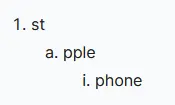
In addition to regular numbers, AsciiDoc also supports multi-level lists.
The default levels are 1 -> a -> i (Arabic numerals -> letters -> Roman numerals), and you can even adjust the starting value.
[AsciiDoc]
. st
.. pple
... phone
Features
Beyond the basic syntax above, AsciiDoc provides many interesting features:
- Automatic tables of contents
- Admonition blocks
- Syntax highlighting
- Including content from HTML, AsciiDoc files, or the web
Drawbacks
AsciiDoc seems powerful enough to do almost anything, but its weakness is that it is not very well known (actually, if you want to render a ‘beautiful’ doc, the syntax is often not very easy to read…). Not many people have heard of it or learned it, and its tools and plugins are far fewer than Markdown’s. Of course, AsciiDoc itself already includes many features, so it does not need as many plugins as Markdown. Still, the official implementation is asciidoctor, written in Ruby, and implementations in other languages are relatively rare.
…
Ironically, this post is written in Markdown. Hugo does not support AsciiDoc natively and still relies on asciidoctor.